The SABRENT Dual-Bay USB-C Hard Drive Docking Station & Cloner review centers on a useful combination: two-bay SATA access, simultaneous read and write, and offline cloning in a tool-free dock.
Its appeal is strongest for people who regularly work with 2.5- or 3.5-inch drives and want a straightforward desktop workflow.
SABRENT EC-CH2B Review Summary
The quick verdict

1,000+ ratings
Read Amazon ReviewsSABRENT EC-CH2B Dual-Bay USB-C Docking Station
A practical fit for users who want to access two SATA drives at once or clone drives without connecting a computer.
- Two bays support simultaneous reading and writing of drives.
- Compatible with 2.5-inch and 3.5-inch SATA HDDs.
- Offline drive-to-drive cloning, with a listed maximum speed of 60MBps.
- USB 3.0 connection supports transfer speeds up to 5Gbps.

Pros
- Combines everyday dual-drive access and standalone cloning in one dock.
- Supports both common 2.5-inch and 3.5-inch SATA drive sizes.
Consider before buying
- Offline cloning is rated up to 60MBps, so buyers prioritizing faster standalone cloning should compare that ceiling with their needs.
- USB 3.0's up-to-5Gbps figure is a maximum interface speed; actual transfers depend on the drives and setup.
Read the full review summary
The EC-CH2B is designed for two SATA hard drives, with support for both 2.5-inch and 3.5-inch formats and capacities over 20TB.
In computer-connected mode, it can read from and write to two drives simultaneously, giving it a practical role in routine file transfers, drive access, and backup work.
Offline cloning is the key extra over a basic dock: drive-to-drive copying can be initiated without a computer, with a listed maximum cloning rate of 60MBps. USB 3.0 provides transfer speeds up to 5Gbps for connected use.
Windows and Mac OS compatibility, hot swapping, tool-free installation, and an HDD access LED add convenience, though the stated maximums should not be read as guaranteed real-world speeds.
The buying factors
SABRENT EC-CH2B Scorecard
Editorial scores reflect listed features and buyer fit; they are not laboratory measurements or customer ratings.
Drive versatility
It supports both 2.5- and 3.5-inch SATA HDDs, covering common laptop and desktop drive formats.
Two-drive workflow
Simultaneous reading and writing makes both bays useful for computer-connected work.
Offline cloning
Cloning without a computer is convenient, with a maximum listed rate of 60MBps.
Computer transfer ceiling
USB 3.0 supports speeds up to 5Gbps, a stated ceiling rather than a guaranteed file-transfer rate.
Setup convenience
Tool-free installation, plug-and-play operation, and hot swapping simplify routine access.
Operating system coverage
The described compatibility includes both Windows and Mac OS.
Large-drive support
Support for drives over 20TB is useful for buyers working with large storage volumes.
Key Features and Specifications of SABRENT EC-CH2B
- Two bays support simultaneous reading and writing of drives.
- Compatible with 2.5-inch and 3.5-inch SATA HDDs.
- Offline drive-to-drive cloning, with a listed maximum speed of 60MBps.
- USB 3.0 connection supports transfer speeds up to 5Gbps.
- Supports drives over 20TB.
- Plug-and-play, hot-swappable operation with tool-free drive installation.
- HDD access LED indicator; compatible with Windows and Mac OS.
Pros and Cons of SABRENT EC-CH2B
Pros
- Combines everyday dual-drive access and standalone cloning in one dock.
- Supports both common 2.5-inch and 3.5-inch SATA drive sizes.
- Simultaneous read and write can help when moving or comparing files across two drives.
- Tool-free installation and hot swapping make repeated drive access simpler.
- Capacity support over 20TB gives it room for high-capacity drives.
Consider before buying
- Offline cloning is rated up to 60MBps, so buyers prioritizing faster standalone cloning should compare that ceiling with their needs.
- USB 3.0's up-to-5Gbps figure is a maximum interface speed; actual transfers depend on the drives and setup.
- The listed drive compatibility is SATA HDDs, so confirm your drive uses a supported 2.5- or 3.5-inch SATA format before buying.
Who Should Buy SABRENT EC-CH2B?
Good fit
Choose the EC-CH2B if you regularly connect bare 2.5- or 3.5-inch SATA drives and want two of them available in one desktop dock.
The ability to read and write both drives simultaneously makes it more flexible than a single-drive reader for routine transfers and file organization.
It is also a sensible candidate if you want offline cloning for occasional drive-to-drive copying without keeping a computer involved.
Consider the listed maximum cloning rate as part of your decision, and make sure it suits the size and timing of the jobs you expect to perform.
For a mix of connected access and standalone cloning, its combination of USB 3.0, broad drive capacity support, and simple installation is the core value.
The Windows and Mac OS compatibility may also suit households or workspaces using both platforms.
Who should skip it
Skip this model if your primary need is a dock for a different drive interface; the described compatibility covers 2.5- and 3.5-inch SATA HDDs. Check the drive interface and physical format before choosing.
Look elsewhere if your cloning workflow requires a higher standalone speed than the listed maximum of 60MBps, or if your work depends on measured transfer performance beyond the stated up-to-5Gbps USB 3.0 ceiling.
How the SABRENT EC-CH2B Fits a Two-Drive Workflow
Two bays for active file work
The dock’s ability to read and write two drives simultaneously is useful when both source and destination need to stay accessible.
That can make it a practical workstation tool for moving files between drives, while the USB 3.0 connection provides the computer link.
Offline cloning without a computer
Standalone cloning adds a second workflow beyond ordinary file access. The listed maximum of 60MBps gives buyers a concrete speed ceiling to consider when deciding whether it suits their cloning jobs; large transfers may require patience.
Check the drive format and capacity
Support for 2.5- and 3.5-inch SATA HDDs and drives over 20TB gives the dock broad capacity range within its stated drive types.
Before ordering, confirm that your existing drives match those formats and that your intended workflow uses SATA HDDs.
Convenience for repeated access
Tool-free installation, hot swapping, plug-and-play operation, and an access LED favor frequent hands-on use. These features reduce setup friction, while the Windows and Mac OS compatibility makes the dock relevant to many mixed-device environments.
Alternatives to SABRENT EC-CH2B
Hard Drive Docking Stations alternative

17,000+ ratings
Read Amazon ReviewsSABRENT DS-U3B4 4-Bay USB 3.0 Docking Station
Choose the EC-CH2B for a two-drive setup and its listed support for drives over 20TB.
Consider the DS-U3B4 if managing up to four drives at once is more useful; its described offline cloning is also available, though its connection is USB 3.0.
- The DS-U3B4 supports up to four 2.5- or 3.5-inch SATA HDDs and SSDs, offers USB 3.0 speeds up to 5Gbps, and includes offline cloning with LED progress indicators.
- The EC-CH2B has two bays and uses USB 3.0, with SATA drive support for 2.5- and 3.5-inch HDDs.
Hard Drive Docking Stations alternative
17,000+ ratings
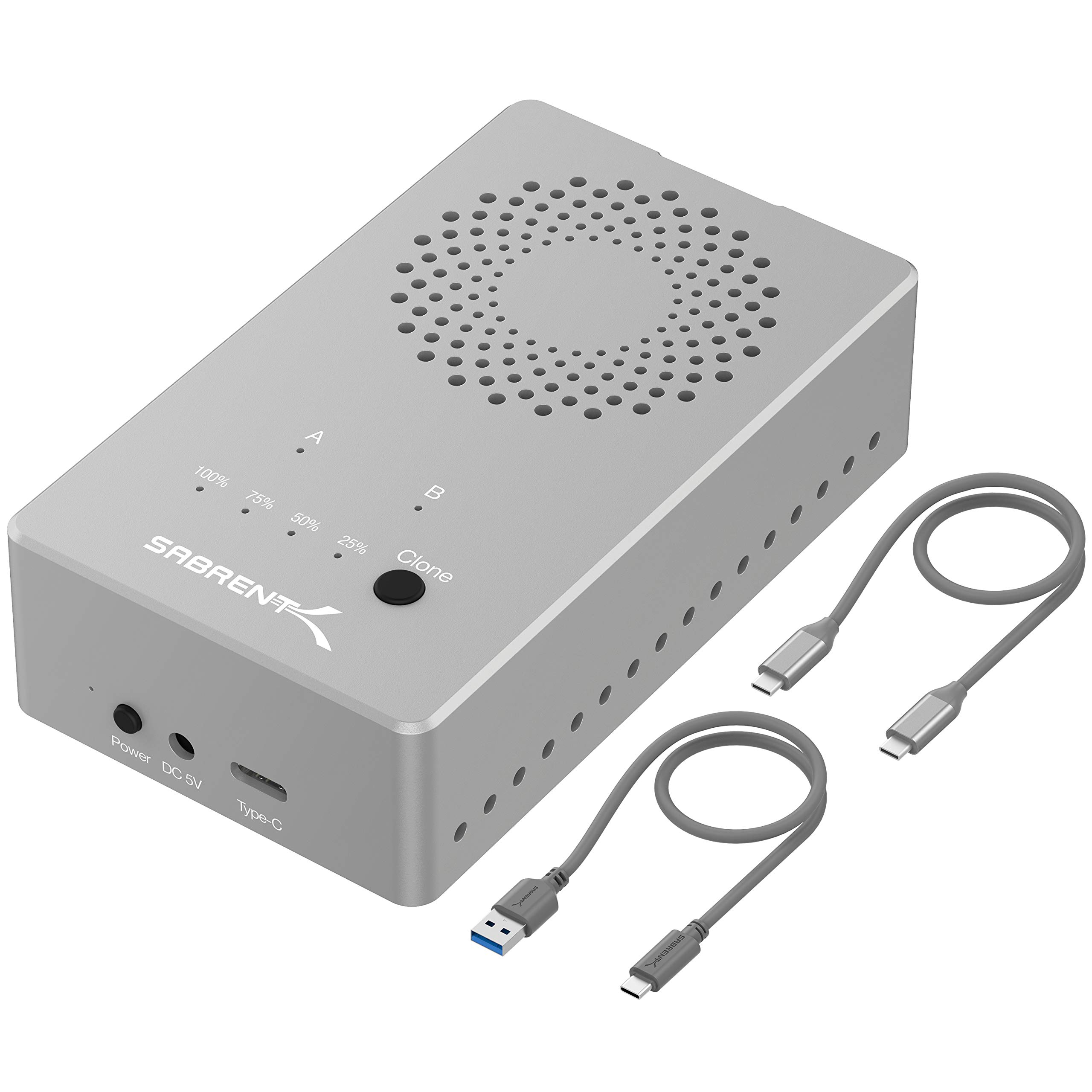
Read Amazon ReviewsSABRENT EC-SSD2 Dual-Bay M.2 NVMe SSD Cloner Dock
Stay with the EC-CH2B if your drives are 2.5- or 3.5-inch SATA HDDs.
The EC-SSD2 is the closer fit for buyers working with supported NVMe M.2 SSDs who want a faster stated interface, provided their SSDs are not M.2 SATA or AHCI.
- The EC-SSD2 is designed for NVMe M.2 SSDs in 2230, 2242, 2260, and 2280 sizes, with USB 3.2 speeds up to 10Gbps and offline cloning; it does not support M.2 SATA or AHCI SSDs.
- The EC-CH2B is for 2.5- and 3.5-inch SATA HDDs and connects over USB 3.0.
Is SABRENT EC-CH2B Worth It?
The SABRENT EC-CH2B is worth considering if you want one tool-free dock for two 2.5- or 3.5-inch SATA HDDs, with simultaneous computer-connected access and offline cloning.
Its large-drive support and Windows and Mac OS compatibility broaden its usefulness for routine storage work.
Buy it with realistic expectations about speed: USB 3.0 is rated up to 5Gbps, while offline cloning is listed up to 60MBps.
If those limits align with your workflow, the combination of dual-bay access and standalone cloning makes this a practical option.
Your review at a glance
1,000+ ratings
Read Amazon ReviewsSABRENT EC-CH2B Dual-Bay USB-C Docking Station
A practical fit for users who want to access two SATA drives at once or clone drives without connecting a computer.
- Two bays support simultaneous reading and writing of drives.
- Compatible with 2.5-inch and 3.5-inch SATA HDDs.
- Offline drive-to-drive cloning, with a listed maximum speed of 60MBps.
- USB 3.0 connection supports transfer speeds up to 5Gbps.